Realistic Watercolor Brushes for Procreate
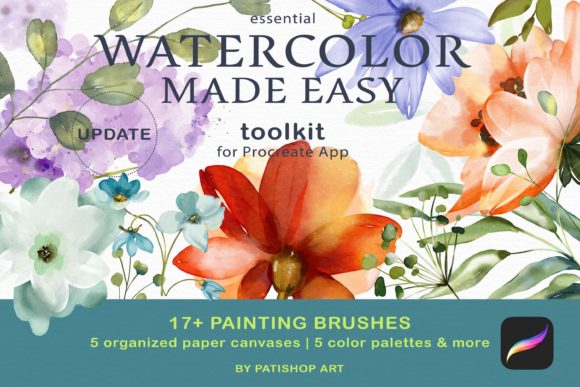
Digital art has long struggled to replicate the organic, unpredictable beauty of traditional media. For years, painters have watched their physical brushes gather dust while trying to force stiff digital tools to behave like wet pigment on paper. The Watercolor Brushes for Procreate toolkit changes this dynamic entirely. Born from a deep understanding of traditional techniques, this collection bridges the gap between the tactile joy of real watercolors and the convenience of the iPad. It is not merely a set of digital stamps; it is a simulation of fluid dynamics, texture, and color mixing designed to feel intuitive from the very first stroke.
The core of this toolkit lies in its authenticity. Each of the 17 essential painting brushes was sampled using high-quality professional-grade paints and papers. This attention to detail ensures that the digital experience mirrors the physical one, capturing the way water blooms, how pigments granulate, and how colors blend on a damp surface. Whether you are a seasoned illustrator or someone who has never held a brush before, the pressure sensitivity and ease of use allow you to focus on creativity rather than fighting the software.
Why Different Creators Choose Digital Watercolors
The appeal of realistic digital watercolors extends far beyond simple convenience. Different types of creators approach these tools with unique priorities, ranging from workflow efficiency to commercial viability. Understanding how these brushes fit into various lifestyles helps clarify their value.
For professional illustrators and freelancers, time is often the most critical resource. Traditional watercolor requires setup, drying time, and a controlled environment. With the Watercolor Made Easy Toolkit, a professional can sketch, paint, and finalize a commission in a single sitting, regardless of location. The inclusion of pre-made watercolor paper canvases at 4800×3600px and 300 DPI means files are print-ready immediately, eliminating the need for complex texture overlays or post-processing. For a marketer or small business owner creating assets for social media or packaging, this speed translates directly to faster turnaround times and lower production costs.
Educators and hobbyists, on the other hand, often prioritize the learning curve and the fear of making mistakes. Traditional watercolor is unforgiving; once paint hits the paper, it is difficult to undo. Digital tools offer a safety net. Beginners can experiment with the "Paint Here Layer" concept, adding new layers as needed without ruining the underlying work. This freedom encourages experimentation. A student learning color theory can test hundreds of combinations using the included color palettes without wasting expensive materials. The intuitive nature of the brushes means less time reading manuals and more time developing artistic muscle memory.
Beyond the Brush: A Complete Ecosystem
While the 17 primary brushes are the stars of the show, the surrounding ecosystem within the toolkit elevates the entire experience. The set includes six color dynamic brushes and five specific watercolor texture brushes. These additional tools allow for nuanced control over the final look. A creator might use the texture brushes to add grain to a background or simulate the roughness of cold-press paper, adding depth that flat digital colors often lack.
The inclusion of five distinct color palettes in .SWATCHES format is another significant advantage. Selecting harmonious colors is a common hurdle for beginners. By providing curated palettes, the toolkit removes the guesswork, allowing users to achieve professional-looking results immediately. For entrepreneurs selling digital products or prints, having a consistent, high-quality aesthetic is vital for brand identity. These palettes ensure that every piece created maintains a cohesive visual language.
Tailoring the Experience to Your Goals
When evaluating whether this toolkit matches your needs, consider your primary objective. Are you looking for speed, realism, or educational value?
- For the Purist: If your goal is to mimic traditional media as closely as possible, the high-resolution sampling and pressure-sensitive engine will likely satisfy your desire for realism. The way the pigment reacts to virtual water offers a level of fidelity that generic brushes cannot match.
- For the Busy Entrepreneur: If you need to produce content quickly, the "open and paint" workflow is ideal. There is no configuration required. You install the .BRUSHSET file, open a canvas, and begin. The reliability of the tools ensures that your creative flow is rarely interrupted by technical glitches.
- For the Aspiring Artist: If you are building a portfolio, the quality of the output matters. These brushes produce results that look hand-crafted and organic, helping your work stand out in a sea of overly polished digital vector art.
It is also worth noting the flexibility these tools offer for different project types. A blogger might use the texture brushes to create unique header images that feel warm and inviting. A publisher could utilize the high-DPI canvases for book cover illustrations that require intricate detail. Even consumers looking to create personalized greeting cards or home decor will find the process accessible and rewarding.
Technical Requirements and Setup
To ensure the best performance, specific hardware and software requirements must be met. The toolkit is designed exclusively for the Procreate app on iPad. Users need an Apple Pencil to fully utilize the pressure sensitivity and tilt features that make the watercolor effect convincing. While the brushes work on various iPad models, the experience is optimized on iPad Pro devices due to their processing power and screen quality.
Installation is straightforward but requires attention to detail. Users must ensure their iOS is updated and that they are running Procreate version 5 or higher. Older versions of the app may not support the advanced rendering engine used in these brushes. Once the .BRUSHSET file is imported, the brushes appear instantly in the library. Similarly, the .PROCREATE canvas files can be shared directly to the app, setting up the perfect workspace with the correct dimensions and resolution automatically.
Making the Decision
Ultimately, the decision to invest in specialized tools like the Watercolor Made Easy Toolkit comes down to what you value in your creative process. If you struggle with the sterility of standard digital brushes or find traditional media too messy and time-consuming, this collection offers a compelling middle ground. It respects the traditions of watercolor painting while embracing the efficiencies of modern technology.
Whether you are a freelancer looking to expand your service offerings, a teacher seeking engaging tools for students, or a hobbyist wanting to rediscover the joy of painting, these brushes provide a robust foundation. They remove technical barriers, allowing your personal style to shine through. The true measure of their success is not just in the features listed, but in the joy of creation they facilitate. When the tools disappear and only the art remains, you know you have found the right fit for your journey.