Bringing Hand-Stitched Texture to Digital Art with 88 Procreate Stitch and Sewing Brushes
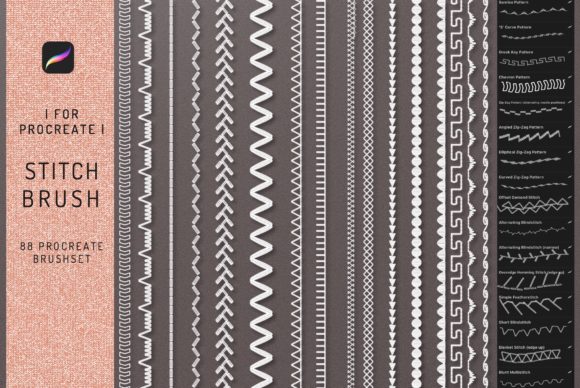
There is a specific warmth to hand-stitched fabric that digital art often struggles to replicate. The slight irregularity of the thread, the way light catches the raised embroidery, and the tactile feel of a seam can make an illustration feel grounded and real. For designers and illustrators working on iPads, bridging the gap between digital efficiency and analog charm used to require complex layer styles or custom texture overlays. However, tools like the 88 Procreate Stitch and Sewing Brushes have changed that workflow entirely. This collection isn't just a set of stamps; it is a comprehensive toolkit designed to inject organic, textile-based realism into your digital projects instantly.
When you download this package, you aren't just getting a few scattered patterns. You are receiving a curated library of 88 distinct brushes tailored specifically for the iOS app Procreate (version 4 and higher). It is crucial to note right away that these are native Procreate assets. They will not function in Photoshop, Clip Studio Paint, or desktop-based software. They are engineered to leverage the Apple Pencil's pressure sensitivity and tilt capabilities on the iPad Pro, ensuring that every stroke behaves like a real needle pulling thread through fabric. Alongside the brush set, the inclusion of an instruction guidebook helps users navigate the nuances of each tool, turning a simple download into a mastered skill.
Why Fashion Designers Are Switching to Digital Stitching
In the fast-paced world of fashion design, speed and presentation are everything. Traditionally, creating a technical flat or a mood board involved scanning physical swatches or manually drawing stitch lines—a time-consuming process that often looked too rigid. With this stitching brush set, fashion illustrators can now sketch a garment and immediately add realistic topstitching, hemming details, or decorative embroidery directly over their vector-like sketches.
Imagine a scenario where a freelance designer needs to present a concept for a denim jacket to a client within 24 hours. Instead of sourcing photos of stitching or drawing every loop by hand, they can use the specialized brushes to map out double-needle stitching along the seams and add frayed edge textures. The result looks hand-crafted but was produced in a fraction of the time. This allows creators to focus more on silhouette and fabric drape while still communicating construction details clearly. For small business owners selling sewing patterns or clothing lines, these brushes elevate social media graphics, making digital mockups look as tangible as the final product.
Elevating Lettering and Branding Projects
Beyond fashion, the trend of "handmade" aesthetics has taken over branding and lettering. Consumers often associate stitched typography with quality, heritage, and care. Whether you are designing a logo for a craft brewery, a badge for a scouting troop, or a wedding invitation suite, the 88 Procreate Stitch Brushes offer a way to achieve this look without needing actual embroidery hoops and floss.
Lettering artists can use these tools to create faux-embroidery effects where the letters appear to be sewn onto a canvas background. By varying the pressure on the Apple Pencil, you can simulate the thickness of the thread or the tightness of the stitch. This is particularly useful for marketers and bloggers who need unique header images or logo variations that stand out from the standard flat-design trends. A coffee shop owner could use these brushes to design a loyalty card graphic that features their name "stitched" in a rustic font, instantly conveying a cozy, artisanal vibe that resonates with their target audience.
A Vital Resource for Tattoo Artists and Motif Creators
One of the most interesting applications for this brush set is in the realm of tattoo design. Many clients request "stick and poke" styles, fine line work, or designs that mimic the look of mended fabric and visible sutures. Tattoo artists using iPads to draft motifs can utilize these brushes to visualize how a design will look with a stitched border or internal hatching that resembles thread work.
Because the brushes are high-resolution and responsive, they allow artists to experiment with complex motifs before committing ink to skin. You can test how a floral element looks when outlined with a running stitch versus a backstitch. This level of experimentation helps in consulting with clients, showing them realistic previews of how the texture will translate to their body art. It serves as a bridge between traditional sketching and modern digital planning, ensuring that the final tattoo retains that raw, hand-done aesthetic.
Educational Uses and DIY Content Creation
Educators and content creators in the DIY space also find immense value in this toolset. If you run a YouTube channel teaching sewing basics or a blog about upcycling clothes, your thumbnails and instructional diagrams need to be clear and engaging. Using standard digital pens to draw stitching instructions can often look sterile or confusing. With these brushes, you can create diagrams that accurately represent different stitch types—like blanket stitches or whip stitches—making it easier for students to understand the visual outcome.
Furthermore, publishers creating e-books on crafting or illustration can use these assets to decorate chapter headers or create interactive elements that feel tactile. It adds a layer of professionalism to educational materials, signaling to the reader that the content is crafted with attention to detail. For hobbyists who simply enjoy digital journaling, adding a stitched border to a daily entry can make the digital page feel like a physical scrapbook, enhancing the emotional connection to the creative process.
Important Considerations Before You Download
While the versatility of this pack is impressive, there are practical factors to consider before integrating it into your workflow. First and foremost, ensure your device compatibility. As mentioned, these files are strictly for Procreate on iPad. If your primary workflow exists in Adobe Photoshop on a desktop, these brushes will not open, and no workaround exists to convert them directly. This is a common point of confusion for buyers accustomed to cross-platform asset libraries.
Additionally, while the instant download format is convenient, taking the time to read the included instruction guidebook is highly recommended. With 88 different brushes, there is a learning curve to understanding which brush works best for heavy wool textures versus fine silk threads. Experimentation is key; don't just stick to one or two favorites. Try combining different opacity settings and blending modes within Procreate to see how the "thread" interacts with your underlying colors. Some brushes may work better on textured paper canvases, while others shine on smooth backgrounds.
Finally, think about the context of your project. While these brushes add beautiful realism, overusing them can clutter a design. Use them intentionally to highlight specific areas, such as a pocket detail on a jacket or the outline of a monogram, rather than applying them indiscriminately across the entire composition. When used with restraint and purpose, the 88 Procreate Stitch and Sewing Brushes transform flat digital illustrations into rich, textured artworks that invite the viewer to reach out and touch the screen.