Mastering Dust, Grunge, and Texture Brushes
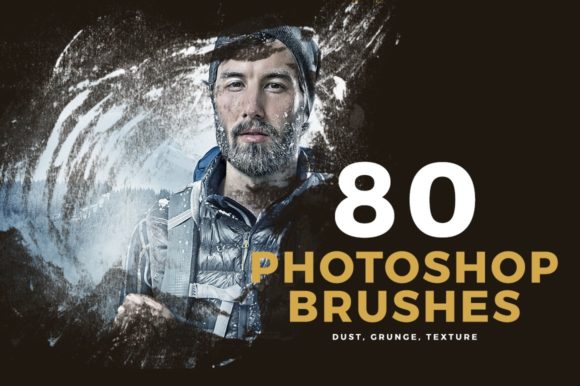
It is really tempting to just dive into all the different brush types there are and what tasks they're used for. You will get plenty of opinions here, and they will probably all be correct. However, the sheer volume of options can be paralyzing if you do not have a clear strategy. When you are deciding which Dust, Grunge, Texture Photoshop Brushes to use, you need to look beyond the preview image. Consider striking brush qualities ranging from shape and length to thickness and stiffness. These subtle variables determine whether your final output looks like a professional print or a digital mess.
Want to add a bit of cohesive coolness to your latest project? You can do it in a snap using specific Photoshop brush techniques. The goal is not just to slap a dirty overlay on a clean vector; it is to integrate imperfection in a way that feels intentional. This beautiful collection of styles offers variety, but understanding how to apply them is where the real value lies.
Defining the Toolkit
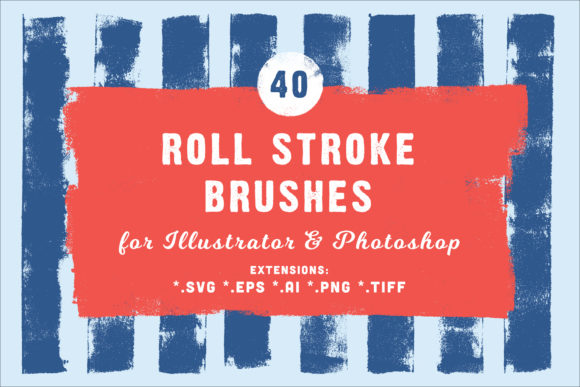
At their core, these tools simulate physical media and environmental wear. Dust brushes mimic airborne particles settling on a lens or paper, adding subtle noise that breaks up flat colors. Grunge brushes introduce heavier distress, simulating ink splatters, worn edges, or stamped effects. Texture brushes provide the underlying grain of canvas, concrete, or rough paper. Together, they bridge the gap between the sterile perfection of digital pixels and the organic chaos of the real world.
Why does this matter? Because human eyes are drawn to complexity. A perfectly smooth gradient often feels artificial. By introducing controlled irregularity, you create visual interest that keeps the viewer engaged longer. Whether you are designing a menu, creating stationery, building a website, or producing concept art, these elements add depth that flat design cannot achieve alone.
Perspectives by Experience Level
Different creators approach these tools with vastly different priorities. What matters to a student learning the ropes is not the same as what a senior art director needs for a national campaign.
The Beginner and Hobbyist
For those just starting out, the primary concern is usually ease of use and learning value. Beginners often struggle with making digital art look "finished." They might spend hours trying to manually paint noise or scratch marks, only to find the result looks repetitive. For this group, a curated set of brushes is a shortcut to professionalism. It allows them to instantly build a huge library of effects without needing to understand the complex mechanics of brush engine settings immediately.
A hobbyist creating a birthday invitation or a personal blog header benefits from the speed these tools offer. They can take a simple photo, apply a grunge mask, and suddenly have a vintage aesthetic that would otherwise require advanced masking skills. The priority here is immediate visual improvement with a low barrier to entry.
The Professional and Freelancer
Experienced users evaluate Dust, Grunge, Texture Photoshop Brushes through the lens of flexibility and reliability. A professional cannot afford a brush set that looks good in the preview but fails when scaled up for a huge print. They need assets that hold up under scrutiny. When working on concept art, preferably for huge prints like posters or mini ads, the resolution and edge definition of the brush are critical.
Freelancers also care deeply about commercial value and speed. Time is money. If a specific brush pack allows a designer to cut their texturing time in half while delivering a unique look that satisfies the client, it pays for itself instantly. Professionals look for variety within a set so they aren't forced to use the same splatter pattern on every project. They need tools that adapt to different brand voices, from gritty streetwear logos to elegant, textured stationery.
Entrepreneurs and Small Business Owners
If you are a small business owner handling your own marketing, your focus shifts to presentation and brand consistency. You might not have the budget to hire a dedicated graphic designer for every social media post or flyer. In this scenario, having a reliable set of texture brushes helps you maintain a cohesive look across all touchpoints. Whether it is a website banner or a printed menu, applying a consistent grain or dust effect can tie disparate elements together, making your brand feel more established and thoughtful.
For entrepreneurs, the risk of looking "generic" is high. Using default software filters often results in a template look. Custom brush work, even if applied simply, signals effort and attention to detail, which builds trust with potential customers.
Practical Applications Across Industries
The utility of these brushes extends far beyond simple photo editing. Here is how different sectors leverage these tools:
- Web Design: Subtle dust textures can break up large blocks of solid color in UI design, reducing eye strain and adding a tactile feel to digital interfaces.
- Print Media: From stationery to large-format posters, grunge brushes add a layer of sophistication. They prevent large areas of ink from looking flat and lifeless under physical lighting.
- Concept Art: Artists use heavy texture brushes to block in environments quickly. Instead of painting every brick or blade of grass, a well-crafted texture brush can suggest detail, allowing the artist to focus on composition and lighting.
- Marketing Materials: Advertisements often need to stand out in a crowded feed. A gritty, textured overlay can make a product shot feel more raw and authentic, appealing to audiences tired of overly polished corporate imagery.
Making the Right Choice
With so many options available, how do you decide which collection fits your needs? Start by identifying your end goal. Are you designing for screen or print? If you are aiming for huge prints, ensure the brushes are high-resolution to avoid pixelation. If you are working on web graphics, file size and load times might influence how you apply these textures.
Consider the cohesiveness of the set. A random assortment of brushes downloaded from various sources often leads to a disjointed final product. A unified collection ensures that the dust, grunge, and texture elements share a similar visual language. This makes it easier to add a real cohesive look to any type of project. When every element shares the same underlying grain or distress style, the design feels intentional rather than accidental.
Also, think about long-term usefulness. Trends come and go. While heavy grunge was dominant in the early 2000s, today's usage is often more subtle. Look for brushes that offer versatility—tools that can be dialed down in opacity for a whisper of texture or ramped up for a bold statement. This flexibility ensures your investment remains relevant as design trends evolve.
Ultimately, Dust, Grunge, Texture Photoshop Brushes are about enhancing your creative voice, not replacing it. They provide the vocabulary to speak in a more organic, human dialect. Whether you are an educator teaching digital arts, a blogger sprucing up headers, or a publisher laying out a magazine, these tools empower you to transform the mundane into the memorable. By understanding the specific qualities of shape, stiffness, and flow, you move from simply applying effects to crafting experiences.
Take the time to experiment. Test how a soft dust brush interacts with a hard grunge stamp. See how a paper texture changes the mood of a vibrant photograph. The right combination will not only help you find the right brushes for the task in hand quickly but will also elevate your concept art and commercial projects to a new level of quality.