Integrating the Foliage Procreate Brush Set 50 Brushes into Your Digital Art Workflow
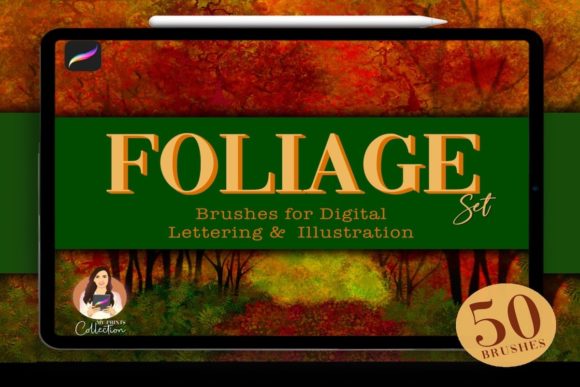
Digital illustration often hinges on the balance between technical precision and organic texture. For artists working in Procreate, bridging the gap between clean vector lines and the chaotic beauty of nature can be a time-consuming hurdle. This is where specialized asset libraries become critical components of a professional workflow. The Foliage Procreate Brush Set 50 Brushes, developed by My Prints Collection, serves as a targeted solution for creators looking to streamline their environmental design process. By providing a curated suite of 50 distinct brushes and tree stamps, this collection allows illustrators, surface pattern designers, and content creators to populate scenes with leaves, grass, clover, and complex forest elements without manually painting every individual detail.
Incorporating a tool like this is not merely about adding a new item to your software; it is about optimizing the production pipeline. Whether you are a freelancer delivering client work under tight deadlines or a hobbyist refining your personal portfolio, understanding how these assets fit into your broader creative strategy is essential for maximizing their value.
Strategic Placement in the Creative Process
The utility of the Foliage Procreate Brush Set 50 Brushes extends across various stages of a project, functioning differently depending on whether you are in the conceptualization, execution, or refinement phase. Recognizing when to deploy these tools can significantly alter your efficiency and the final aesthetic quality of your work.
During Conceptualization and Sketching
In the early stages of landscape design, speed is paramount. Artists often struggle to visualize density and composition when drawing foliage stroke-by-stroke. Using the tree stamps included in this set allows for rapid blocking of major forms. You can establish the silhouette of a forest or the placement of a singular oak tree in seconds. This facilitates quicker iteration; if a composition feels unbalanced, you can move or resize a stamp instantly rather than erasing hours of hand-painted work. This approach supports a "fail fast" methodology, enabling you to test multiple layout variations before committing to detailed rendering.
Execution and Texturing
Once the composition is locked, the 50 unique brushes within the set transition from compositional placeholders to textural assets. The variety included—ranging from fine grass blades to broad leaf clusters—allows for layering techniques that mimic natural depth. A practical workflow involves using larger, opaque brushes for foreground elements to create focus, while utilizing softer, semi-transparent foliage brushes for background layers to simulate atmospheric perspective. This method reduces the cognitive load on the artist, who no longer needs to engineer custom brush settings for every type of plant life encountered in a scene.
Post-Production and Refinement
Even after the primary illustration is complete, these brushes serve a vital role in harmonizing the image. Often, digital art can feel too sterile or "clean." Applying subtle overlays of clover or scattered leaves using low-opacity settings can unify disparate color palettes and add a layer of organic noise that grounds the piece. For marketers and bloggers creating visual content, this final touch can elevate a standard graphic into a polished, professional asset that resonates better with audiences seeking authenticity.
Technical Compatibility and Software Requirements
Before integrating any new asset into your toolkit, verifying technical compatibility is a non-negotiable step in resource management. The Foliage Procreate Brush Set 50 Brushes is engineered specifically for the iPad ecosystem. It requires Procreate App version 5 or higher. This specificity ensures that the brush dynamics, grain textures, and stamp behaviors function as intended, leveraging the latest rendering engines within the app.
It is crucial to note what this tool is not. These files are not compatible with Adobe Photoshop, Illustrator, or other desktop-based raster or vector software. Attempting to import them into unsupported platforms will result in errors or unusable data. For professionals operating in a hybrid environment—perhaps sketching on an iPad and finishing in Photoshop—this necessitates a clear decision point in the workflow. If your final output must be editable in Photoshop, you may need to rasterize the foliage layers in Procreate before exporting, or use this set strictly for the initial concept phase before recreating elements in a cross-platform friendly format. Understanding this limitation prevents workflow bottlenecks and ensures you select the right tool for the specific stage of your production pipeline.
Workflow Integration and Organization
Adopting a new brush set effectively requires more than just installation; it demands organization. When you download the Foliage Procreate Brush Set 50 Brushes by My Prints Collection, you are introducing 50 new variables into your interface. Without a structured approach, this can lead to "tool paralysis," where the sheer number of options slows down decision-making.
To maintain efficiency, consider the following implementation strategies:
- Create a Dedicated Brush Group: Upon importing, immediately organize the brushes into a specific group labeled "Foliage - My Prints." Do not leave them mixed with default Procreate brushes or other third-party downloads. This isolates the toolset, making it easier to locate specific textures during high-pressure drafting sessions.
- Develop a Swatch Palette: Nature is rarely a single shade of green. Create a companion color palette featuring earth tones, varied greens, autumnal reds, and muted browns. Testing the brushes against this predefined palette before starting a project helps you understand how the texture interacts with different hues, saving time on color correction later.
- Map Usage Scenarios: Spend ten minutes testing each of the 50 brushes on a scratch canvas. Note which brushes work best for foreground details versus background fills. Some users find it helpful to rename the brushes internally (e.g., "Foreground Grass," "Distant Pine") to align with their personal vocabulary, speeding up recall during the creative flow.
Enhancing Consistency and Quality Control
For entrepreneurs, educators, and publishers producing series-based content, consistency is key to brand recognition. Using a standardized set of foliage assets ensures that every piece of content—from a blog header to an educational worksheet—shares a cohesive visual language. The Foliage Procreate Brush Set 50 Brushes provides a unified style of texture that, when used repeatedly, becomes part of your visual identity.
However, reliance on pre-made assets carries the risk of generic-looking results. To maintain high quality control, avoid using the stamps at 100% opacity repeatedly without variation. Instead, utilize Procreate's blending modes. Experiment with Multiply for shadow integration or Overlay for highlighting sunlit leaves. Adjusting the size and rotation of the stamps manually, rather than relying on the default orientation, prevents repetitive patterns that can break the viewer's immersion. The goal is to use the tool to accelerate the creation of unique art, not to generate identical copies.
Long-Term Value and Skill Development
Investing in a specialized tool like this is also an investment in skill development. For beginners, studying how these brushes are constructed—their grain, shape dynamics, and pressure sensitivity curves—can be an educational exercise. By analyzing how the My Prints Collection achieved specific organic looks, learners can reverse-engineer these techniques to eventually create their own custom brushes.
For seasoned professionals, the long-term value lies in time reclamation. Hours previously spent rendering individual blades of grass can be redirected toward lighting, composition, or storytelling. In a business context, this efficiency translates directly to higher throughput and the ability to take on more projects without compromising quality. As your library of assets grows, maintaining a disciplined workflow ensures that tools like the Foliage Procreate Brush Set 50 Brushes remain assets that drive productivity rather than clutter that hinders it.
Ultimately, the successful integration of this brush set depends on viewing it as a component of a larger system. It is not a magic wand but a highly efficient instrument that, when paired with thoughtful planning, organizational discipline, and artistic intent, can significantly enhance the quality and speed of your digital nature and forest landscape art.